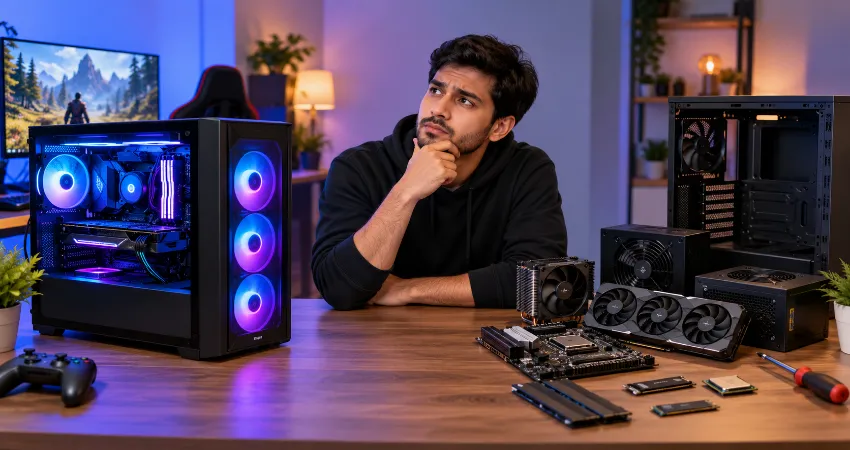
Prebuilt gaming PCs have a strange reputation. Some PC enthusiasts describe them as overpriced machines filled with cheap components, while other buyers see them as the easiest way to get a powerful gaming computer without spending an afternoon installing parts and troubleshooting cables. Both views contain some truth, but neither tells the whole story.
I approached this comparison the same way I would evaluate a gaming PC for my own money. Instead of looking only at the processor and graphics card printed in large letters on the product page, I considered the complete system: motherboard, memory configuration, storage, power supply, cooling, Windows license, assembly, warranty, technical support, and future upgrade options. That changes the value equation considerably.
My conclusion is fairly simple: most prebuilt gaming PCs are not automatically a rip-off. A poorly configured prebuilt certainly can be bad value, but a well-designed system can justify its higher price for the right buyer. The important part is knowing what you are actually paying for.
Why Prebuilt Gaming PCs Often Look Overpriced?
The biggest reason prebuilts appear expensive is that buyers naturally compare the advertised processor and graphics card with individual component prices. If a gaming desktop contains a CPU and GPU that seem inexpensive compared with the total system price, the difference can look like an enormous markup.
But the CPU and graphics card are only two pieces of the computer. A complete build also requires a motherboard, RAM, SSD, power supply, case, CPU cooler, fans, operating system, assembly, packaging, testing, warranty administration, and customer support. Once those costs are included, the difference between building and buying can become much smaller.
The Better Question Is: What Are You Paying Extra For?
I think this is the most useful way to evaluate a prebuilt. Do not simply ask whether it costs more than buying the components yourself. Ask what you receive in exchange for the difference.
A reasonable premium may cover professional assembly, system testing, Windows installation, cable management, technical support, and one centralized warranty. For someone who already knows how to diagnose a failed motherboard or replace a power supply, those services may have little value. For a first-time PC owner, they can be extremely useful.
The prebuilt becomes poor value when the additional cost is large while the manufacturer provides weak components, limited upgrades, poor cooling, or minimal support.
The Hidden Components Matter More Than Most Buyers Realize
One pattern I would watch carefully is vague specifications. A listing might proudly advertise a powerful processor, graphics card, 16GB of RAM, and a 1TB SSD while providing almost no information about the motherboard or power supply.
Those unspecified components deserve attention. The graphics card determines much of your gaming performance, but the power supply affects reliability and future GPU upgrades. The motherboard affects expansion, connectivity, memory support, and CPU upgrade possibilities. Cooling affects temperature and noise.
Memory configuration matters too. Two memory modules can provide a different configuration from a single module of the same total capacity. Storage specifications should ideally tell you more than capacity alone. When manufacturers provide exact component models, evaluating the machine becomes much easier.
Do Prebuilt Manufacturers Use Cheap Parts?
Some do, but treating every prebuilt the same would be inaccurate. There is a major difference between large OEM systems built around proprietary designs and gaming desktops assembled largely from standard retail-style components.
Cost reduction is normal in mass-produced computers. Manufacturers may use simpler motherboards, basic memory, lower-cost SSDs, modest CPU coolers, or power supplies selected specifically for the original configuration. That does not automatically mean the computer is unsafe or unreliable. The real question is whether those parts are appropriate for the hardware they support.
A 500-watt power supply can be perfectly reasonable in one system and restrictive in another. A basic motherboard can run the installed processor correctly yet provide fewer expansion options. Specifications need to be evaluated as a complete package rather than judged by brand recognition alone.
Building Your Own PC Still Has a Major Price Advantage
If your priority is maximizing hardware for every dollar, building your own PC remains difficult to beat. You control every component and can redirect money toward the hardware that affects your particular games most.
You might choose a less decorative case and put the savings toward a faster GPU. You can select the exact power supply you trust, choose a motherboard with the features you need, and avoid paying for accessories that do not matter to you.
There is another advantage that is often overlooked: component-level warranties. Retail PC components frequently have their own manufacturer warranty terms. In a self-built computer, however, you are also responsible for determining which component has failed and dealing with the appropriate manufacturer or retailer.
Warranty Support Is Part of the Price
A prebuilt’s warranty can have genuine financial value, particularly for buyers who are uncomfortable diagnosing PC problems. As of 2026, warranty coverage varies significantly among manufacturers. NZXT states that its new gaming PCs include a two-year limited warranty, while iBUYPOWER currently advertises three years of labor and three years of parts coverage for qualifying new desktop purchases beginning July 1, 2026. HP’s warranty can vary by model and country.
This is why comparing only specifications can be misleading. Two computers with almost identical gaming hardware may offer substantially different after-sales coverage. Before buying, read the actual warranty instead of assuming every gaming PC receives similar protection.
Where Some Prebuilts Really Become Bad Value?
There are several warning signs that would make me reconsider a system. The first is an unusually powerful GPU paired with an obviously weak supporting platform. Limited cooling, very low storage capacity, a restrictive power supply, or inadequate memory can turn an attractive specification sheet into an inconvenient computer.
Proprietary parts are another concern. Custom motherboard layouts, unusual power connectors, or nonstandard cases can make future upgrades harder. This does not necessarily make the original computer bad, but it matters if you expect to keep upgrading the machine for five or six years.
I would also be cautious when important specifications are hidden entirely. If I cannot determine the power supply rating, RAM configuration, motherboard capabilities, cooling setup, or available expansion slots, I would not purchase based solely on the CPU and GPU names.
When Paying More for a Prebuilt Makes Sense?
A prebuilt makes the most sense when convenience has real value to you. Perhaps you need a computer immediately, do not enjoy assembling hardware, or simply want one company to contact when something goes wrong.
There is nothing irrational about paying for those advantages. People routinely pay for professional assembly and technical services in other areas. The mistake is assuming that the cheapest collection of individual components and a professionally assembled computer are identical products.
For students, parents purchasing a first gaming PC, busy professionals, and anyone uncomfortable troubleshooting hardware, a sensible premium can be worth paying.
My Prebuilt Gaming PC Buying Checklist
Before buying, I would write down the exact CPU and GPU, RAM capacity and configuration, SSD capacity, motherboard information, power supply wattage, cooling system, case airflow, warranty length, and upgrade options. I would then price a roughly equivalent DIY build rather than comparing only the CPU and GPU.
If the prebuilt costs somewhat more but provides good components, professional assembly, an operating system, and useful support, the difference may be reasonable. If it costs dramatically more while hiding several component details, I would keep looking.
FAQs About Prebuilt Gaming PCs
1. Are all prebuilt gaming PCs overpriced?
No. Pricing varies considerably between manufacturers, configurations, sales periods, and component generations. Some systems carry a noticeable convenience premium, while others can become surprisingly competitive when discounted. Evaluate the complete specification rather than assuming every prebuilt is poor value.
2. Is building a gaming PC always cheaper?
Not necessarily. DIY building often provides better component control and value, but individual part prices fluctuate. You should also account for the operating system and any additional cooling or accessories required to create an equivalent machine.
3. What component should I check first in a prebuilt?
After confirming the CPU and GPU, check the power supply, RAM configuration, motherboard, cooling, and storage. These components are frequently given less attention in advertisements even though they can influence reliability, performance, and upgradeability.
4. Are proprietary components always bad?
No. A proprietary component can work perfectly for the computer’s original configuration. The disadvantage usually appears later when you want to change the case, motherboard, power supply, cooling system, or other hardware and discover limited compatibility.
5. How much extra should I pay for a prebuilt?
There is no universal percentage because prices change constantly. Instead, calculate the cost of a reasonably equivalent DIY system and decide whether the remaining difference is justified by assembly, software, support, warranty coverage, and convenience.
6. Should beginners buy prebuilt gaming PCs?
They can be an excellent choice for beginners. A good prebuilt allows someone to start using the computer without learning PC assembly first. The key is choosing a machine with transparent specifications and enough upgrade flexibility for future needs.
7. Can I upgrade a prebuilt gaming PC later?
Many prebuilts can be upgraded, particularly systems that use standard desktop components. Before buying, check motherboard slots, available storage connections, case dimensions, power supply capacity, RAM limits, and whether any important components use proprietary connectors.
8. Does a prebuilt warranty make it worth buying?
That depends on how much you value centralized support. With a prebuilt, one company can often handle diagnosis and covered repairs. With a DIY computer, individual components may have warranties, but identifying the faulty part and managing separate claims becomes your responsibility.
9. What is the biggest mistake people make when buying a prebuilt?
Focusing almost entirely on the graphics card and processor is one of the biggest mistakes. Those parts are important, but a balanced gaming PC also needs adequate memory, storage, cooling, power delivery, and an upgrade-friendly platform.
10. How can I tell if a prebuilt gaming PC is actually a good deal?
Compare its full component list with a similar DIY configuration, inspect the warranty, research upgrade limitations, and check whether the manufacturer identifies important components clearly. A good deal should provide appropriate hardware throughout the system, not simply an impressive GPU attached to the cheapest possible supporting parts.
Conclusion
So, are prebuilt gaming PCs a rip-off? After comparing what you actually receive, I do not think that label is fair. Bad prebuilts exist, but so do well-balanced systems that charge a reasonable amount for assembly, software, testing, convenience, and support.
The smartest approach is to stop judging a computer by its CPU and GPU alone. Examine the entire parts list, warranty, cooling, power supply, and upgrade path. If the extra cost buys services you genuinely value, a prebuilt can be a sensible purchase. If the manufacturer hides important specifications or charges substantially more without providing meaningful benefits, building your own PC becomes the stronger option.