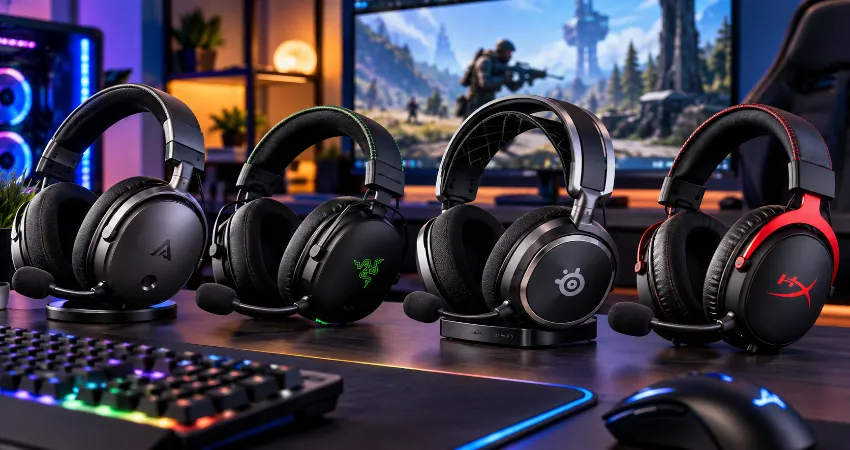
A good gaming headset has to do more than make explosions sound impressive. When I evaluate a headset for serious gaming, I pay closer attention to positional audio, comfort, microphone clarity, wireless delay, consistency, and how the headset behaves after several hours of use. Those details matter far more to me than exaggerated bass or a long list of features that rarely improve the actual experience.
The challenge is that competitive and casual gaming demand slightly different things. In competitive shooters, I want clean directional information and minimal distraction so footsteps, reloads, movement, and environmental cues remain easy to identify. During story-driven games, racing titles, RPGs, music, or movies, I want richer bass, better detail, and a more natural sense of space. After comparing current premium and mid-range options using manufacturer specifications and independent performance testing, a few headsets stand out as particularly convincing all-rounders.
Below are the gaming headsets I would currently put at the top of the list for players who do not want separate headphones for competitive matches and relaxed gaming sessions.
Audeze Maxwell 2: My Pick for the Best Overall Sound
The Audeze Maxwell 2 is the headset I would choose when sound quality takes priority over almost everything else. Its 90 mm planar magnetic drivers are very different from the conventional dynamic drivers used in most gaming headsets. The result is a presentation that can remain detailed and controlled even when a game becomes busy. Background music, dialogue, weapons, footsteps, and environmental effects are easier to distinguish without everything becoming one aggressive wall of sound.
That balance makes the Maxwell 2 unusually good for both types of gaming. Competitive players can benefit from its detailed presentation, while casual players get the fuller and more cinematic sound that makes single-player games enjoyable. It also supports low-latency wireless audio and high-resolution playback through compatible connections.
Battery life is another major advantage. Audeze rates the Maxwell 2 for more than 80 hours of wireless use, while a short fast charge can provide many additional hours of playback. The microphone has also been improved compared with the original Maxwell and performs particularly well for voice communication.
The main compromise is weight. Planar magnetic hardware is not especially light, and the Maxwell 2 is heavier than many esports-focused models. If you frequently play for five or six hours without removing your headset, fit and weight distribution should be considered before making it your first choice.
Razer BlackShark V3 Pro: Best for Competitive Gaming
If my priority were fast competitive shooters, the Razer BlackShark V3 Pro would be one of the first models I would consider. Razer designed it around esports-style use, with its HyperSpeed Wireless Gen-2 connection rated for audio latency as low as 10 ms under supported conditions. That matters because competitive audio should feel immediate rather than slightly disconnected from what appears on screen.
The BlackShark V3 Pro also gives players a useful amount of control over its sound. Game-specific EQ profiles and customizable settings can help emphasize the frequency ranges where positional information is most useful. Instead of simply making everything louder, I prefer reducing unnecessary low-frequency energy slightly and keeping the midrange and upper frequencies clear enough for movement cues.
Another advantage is active noise cancellation. It will not replace dedicated travel headphones designed primarily for maximum isolation, but it can reduce distracting environmental sound around a gaming setup. The headset also supports 2.4 GHz wireless, Bluetooth, USB, and analog connectivity, making it more flexible than a simple single-device esports headset.
Its sound signature is more energetic than the Maxwell 2, which can make action games entertaining, although listeners who prefer highly neutral music reproduction may prefer the Audeze. For competitive gaming first and entertainment second, however, the BlackShark V3 Pro makes a strong argument.
SteelSeries Arctis Nova Elite: Best for a Multi-Device Gaming Setup
The SteelSeries Arctis Nova Elite makes the most sense for someone whose desk contains several gaming systems. Its GameHub can work with multiple sources, and its connectivity system is considerably more advanced than what most conventional wireless headsets offer. That means moving between a PC and different consoles can require far less cable swapping and device reconfiguration.
The headset supports 96 kHz, 24-bit processing through compatible wireless operation and uses carbon-fiber drivers. More importantly for everyday use, SteelSeries provides extensive EQ and audio-management options through its software. PC users can separately control game audio, chat, music, and other applications, which becomes genuinely useful once several audio sources are running simultaneously.
The Arctis Nova Elite also includes strong active noise reduction and a retractable microphone. Its two-battery system is one of my favorite practical concepts in premium wireless headset design. One battery can remain inside the headset while the other charges in the GameHub. Instead of plugging the headset in when the battery becomes low, you simply exchange batteries and continue playing.
The drawback is straightforward: this is a premium setup with features many people will never fully use. If you own only one PC and rarely switch devices, a simpler headset provides better value. For a desk built around several platforms, though, its flexibility is difficult to ignore.
HyperX Cloud III S Wireless: Best Practical All-Day Choice
Not everyone needs an elaborate base station or audiophile-focused drivers. The HyperX Cloud III S Wireless takes a more traditional approach and concentrates on comfort, durability, wireless flexibility, and extremely long battery life.
HyperX rates it for up to 120 hours through its 2.4 GHz wireless connection and up to 200 hours using Bluetooth under its specified testing conditions. Real battery performance always depends on volume, connection type, battery condition, and usage, but even allowing for variation, those figures make frequent charging far less important.
It uses angled 53 mm drivers and supports 2.4 GHz wireless as well as Bluetooth. That combination makes it easy to use for gaming and then switch to music, videos, or mobile devices. Its design also continues the Cloud family’s focus on padded earcups and a durable metal-supported frame.
I would consider this model particularly suitable for players who want something dependable rather than constantly adjusting software. It does not try to outperform every premium headset in every technical category. Instead, it covers the essentials well and reduces day-to-day inconvenience.
How I Choose a Headset for Competitive Games?
For competitive gaming, I would prioritize positional clarity before bass quantity. A headset that creates huge explosions but hides quieter directional cues can actually make competitive play more difficult. Low wireless latency is also important, especially in fast games where audio and visual information need to remain synchronized.
Microphone quality should not be overlooked either. Teammates do not need studio-quality voice recording, but they do need clear speech that remains understandable when keyboard noise or room noise is present. Finally, comfort matters because pressure around the ears or the top of the head becomes increasingly noticeable during longer sessions.
How I Choose a Headset for Casual and Single-Player Gaming?
My priorities change slightly for casual gaming. I still want clarity, but bass extension, spaciousness, musical detail, and overall immersion become more important. An RPG with a large orchestral soundtrack or an atmospheric adventure game benefits from a headset capable of reproducing small environmental details as well as powerful low-frequency effects.
This is where a balanced headset such as the Maxwell 2 becomes especially appealing. It does not force me to choose between competitive detail and enjoyable entertainment. Players who prefer a more energetic presentation may instead enjoy the BlackShark V3 Pro.
Do Not Ignore Comfort and Fit
Specifications cannot tell you whether a headset will fit your head correctly. Clamp pressure, earpad depth, glasses, head size, temperature, and headset weight can completely change the experience. A technically excellent headset becomes a poor purchase if you constantly remove it because your ears or head feel uncomfortable.
For long sessions, I recommend paying attention to weight distribution rather than weight alone. A heavier headset with a well-designed suspension system can sometimes feel better than a lighter headset that concentrates pressure on one small area.
My Recommended Competitive Audio Setup
Start with a relatively balanced EQ rather than immediately selecting an extreme preset. If footsteps feel hidden, slightly reduce dominant bass before dramatically increasing treble. Excessive treble can make weapons, voices, and sharp effects tiring without necessarily improving positioning. I also recommend comparing stereo and spatial modes yourself. Some games already contain excellent spatial audio processing, so adding another layer of virtual processing does not automatically improve directionality.
Questions And Answers
1. What is the best gaming headset for both competitive and casual gaming?
The Audeze Maxwell 2 is my strongest overall recommendation when sound quality is the main priority. Its planar magnetic drivers provide detailed audio that works well for positional information while still producing the depth and refinement expected from cinematic games, music, and entertainment. Players who prioritize lower weight, ANC, and competitive-focused features may prefer the Razer BlackShark V3 Pro.
2. Is the Audeze Maxwell 2 good for competitive FPS games?
Yes. Its detailed sound reproduction makes subtle environmental information easier to separate from louder effects. However, it is heavier than many dedicated esports headsets. Players who value extremely lightweight comfort or aggressive competitive EQ presets may find an esports-focused design more suitable.
3. Which gaming headset is best for hearing footsteps?
There is no headset that magically reveals footsteps in every game because game audio engines and sound mixes differ. The BlackShark V3 Pro is particularly useful for competitive players because it combines low-latency wireless performance with customizable EQ and game-focused profiles. A carefully adjusted EQ can often be more useful than simply buying a headset with exaggerated treble.
4. Does wireless audio cause noticeable delay while gaming?
Modern gaming headsets using dedicated 2.4 GHz wireless connections can achieve sufficiently low latency for demanding gameplay. Bluetooth alone can introduce considerably more delay depending on the codec and device. For competitive gaming, I recommend using the manufacturer’s dedicated USB wireless transmitter whenever one is available.
5. Is a more expensive gaming headset always better?
No. Higher prices often provide better materials, advanced wireless systems, ANC, premium drivers, or multi-device features, but those improvements may be irrelevant to some players. Someone using one PC and playing a few hours per week may get more practical value from a comfortable mid-range headset than from a complex flagship model.
6. Do I need active noise cancellation for gaming?
Not necessarily. ANC is useful when you play near conversations, traffic, fans, air conditioning, or other consistent background sounds. In a quiet room, good passive isolation may already be sufficient. I would treat ANC as a useful environment-specific feature rather than a requirement for good gaming audio.
7. Should I use surround or stereo audio for competitive gaming?
Try both because the answer depends heavily on the game. Many modern titles already use sophisticated positional audio systems that work very well through stereo headphones. Additional virtual surround processing can improve immersion in some games but may make directional information less precise in others. Test the same familiar map or scene with both modes before deciding.
8. How important is microphone quality in a gaming headset?
It becomes very important when you regularly communicate with teammates, stream, attend voice calls, or play in a noisy environment. A good microphone should reproduce speech clearly without making the voice sound excessively thin or muffled. Effective background-noise handling can be just as valuable as raw recording quality.
9. Which headset is best if I use several consoles and a PC?
The SteelSeries Arctis Nova Elite is especially attractive for complex setups because its GameHub and extensive connectivity options are designed around switching and mixing multiple sources. Players using several systems regularly are more likely to benefit from its advanced hardware than someone gaming exclusively on one platform.
10. What should I check before buying a gaming headset?
Check platform compatibility, connection options, comfort, weight, microphone quality, battery life, software support, and whether important features work on your specific console or computer. Also decide what matters most to you before comparing specifications. Competitive players may prioritize latency and positional clarity, while casual players may care more about sound quality, comfort, and immersion.
Conclusion
The best gaming headset depends on what you want your audio to accomplish. For overall sound quality and a strong balance between competitive detail and casual immersion, the Audeze Maxwell 2 is my preferred choice. The Razer BlackShark V3 Pro is particularly compelling for competitive-focused players, while the SteelSeries Arctis Nova Elite makes more sense for sophisticated multi-device setups. The HyperX Cloud III S Wireless is the practical option for players who value comfort, flexible wireless connectivity, and exceptional battery endurance.
Rather than choosing a headset because it has the longest feature list, identify the two or three qualities that directly affect the games you actually play. That approach usually leads to a better purchase and, more importantly, a better experience every time you put the headset on.