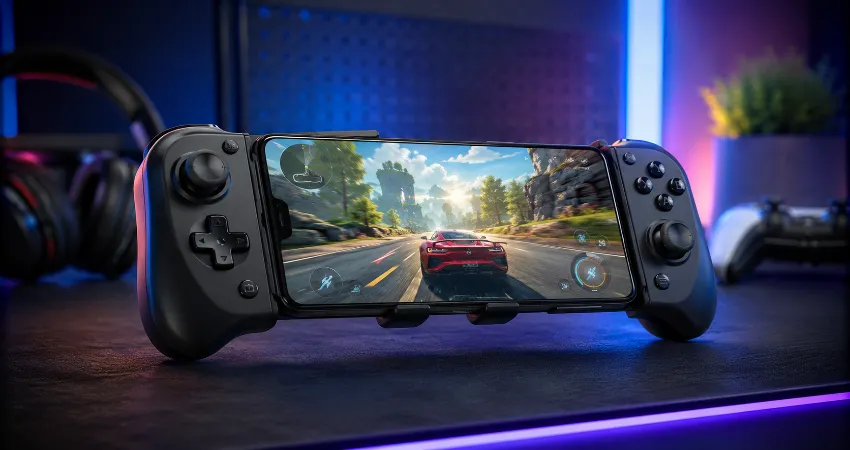
Phone gaming has reached the point where the touchscreen is often the weakest part of the experience. Fast shooters need accurate stick movement, racing games feel better with analog triggers, and console Remote Play can be frustrating when half the screen is covered by virtual buttons. A good mobile controller fixes most of those problems while making a phone feel much closer to a dedicated handheld.
For this guide, I focused on the things that matter during actual play rather than simply comparing specification sheets. I looked closely at stick accuracy, trigger control, grip comfort, connection method, phone and case compatibility, extra buttons, charging options, and how suitable each design is for longer gaming sessions. I also compared current manufacturer specifications with recent independent hands-on testing before choosing the controllers worth considering.
My biggest takeaway is simple: there is no single perfect controller for every phone gamer. Someone playing racing and action games at home needs something different from a commuter who wants a controller that can quickly slip into a bag. These are the models that make the most sense for those different situations.
Best Overall: GameSir G8 Plus
The GameSir G8 Plus is the controller I would start with for most people because it balances comfort, modern controls, device compatibility, and price unusually well. It uses Bluetooth instead of connecting directly through the phone’s USB-C port, which means it can work with a wider variety of devices. GameSir lists support for mobile devices, tablets, PC, and Switch, with an adjustable opening designed for devices from about 120 mm to 215 mm long.
The hardware is more impressive than I normally expect from a mid-priced mobile controller. You get Hall Effect analog sticks, Hall Effect triggers, two rear buttons, motion controls, interchangeable controls, vibration, and software customization. The larger grips also make it feel much closer to a normal console controller than many ultra-thin phone gamepads.
That combination is particularly useful in action games and shooters where smooth stick movement matters. The analog triggers also make the G8 Plus a better fit for racing games than controllers with short, almost button-like triggers. Its main compromise is Bluetooth. I generally prefer a direct USB-C connection when minimum input delay and zero charging management are priorities. There is also no 3.5 mm headphone jack on this version.
Best Wired Choice: GameSir G8 Plus MFi
If you like the shape of the G8 Plus but prefer a direct connection, the newer G8 Plus MFi is arguably even more interesting. It uses a built-in USB-C connection, works with compatible iPhone, iPad, and Android devices, and does not contain its own battery. Once connected, it draws power from the phone and supports pass-through charging.
GameSir also gives it Hall Effect sticks and analog triggers, two rear buttons, a tactile D-pad, vibration motors, physically swappable ABXY controls, and a 3.5 mm headphone connection. For games where quick reactions matter, I would choose this wired design over Bluetooth when both options fit the phone. There is nothing to pair before playing, and there is no controller battery to remember to charge.
The important step is checking your phone carefully before buying. USB-C controllers depend on physical alignment as well as software compatibility. Thick cases, unusually large camera sections, and recessed USB-C openings can sometimes make telescopic controllers awkward even when the phone itself is technically supported.
Best Premium Controller: Razer Kishi V3 Pro
The Razer Kishi V3 Pro is designed for players who want their phone controls to feel as close as possible to a full-size gamepad. Instead of making everything tiny for portability, Razer uses larger ergonomic handles, full-size TMR thumbsticks with replaceable caps, mecha-tactile buttons, two rear buttons, and two additional claw-grip bumpers.
The four remappable extra controls are especially valuable in games where taking a thumb off the right stick can interrupt movement or camera control. The controller connects through USB-C and supports pass-through charging. Razer also designed the telescopic bridge to accommodate phones and some mini tablets up to around eight inches, making it unusually flexible for players who use more than one mobile device.
This is the controller I would prioritize for long Remote Play sessions, demanding action games, or anyone coming directly from a premium console controller. The trade-offs are size and cost. It weighs about 268 grams before you add the phone, so the complete setup is noticeably more substantial than a compact Backbone-style controller. Razer’s advanced haptic feature also has platform limitations, so not every feature works identically on Android and iOS.
Best for Comfort: ELO Vagabond
The ELO Vagabond takes a similar comfort-first approach without becoming quite as heavy. It uses a direct USB-C connection and combines Hall Effect sticks, Hall Effect analog triggers, mechanical buttons, two programmable rear controls, pass-through charging, and a 3.5 mm headset jack.
One feature that stands out is its adapter system. ELO includes multiple size adapters designed to help the controller accommodate different phones and cases. The company lists compatibility with devices up to roughly 208 mm and also supports compact tablets such as the iPad mini. At about 198 grams, the controller itself remains reasonably manageable considering the substantial grips.
I would look closely at the Vagabond if hand comfort matters more to you than having the smallest possible controller in your backpack. Full-size grips become increasingly valuable once a gaming session lasts beyond a quick ten or fifteen minutes.
Best Simple Plug-and-Play Option: Backbone One 2nd Generation
The Backbone One became popular for a good reason: it makes turning a phone into a handheld feel extremely straightforward. The second-generation model improves phone and case fit through interchangeable magnetic adapters and retains useful features such as pass-through charging and a headphone connection.
Its smaller controls are both its strength and weakness. The controller is easy to carry and feels much less bulky than a console-sized alternative, but players with larger hands may prefer the deeper grips and larger sticks found on the GameSir, Razer, or ELO models. For short sessions, travel, indie games, platformers, and straightforward Remote Play, however, its compact design remains appealing.
How I Would Choose a Controller for Different Games?
For shooters and fast action titles, I prioritize accurate sticks, accessible rear controls, and a direct connection. That pushes the Razer Kishi V3 Pro and wired GameSir G8 Plus MFi toward the top. For racing games, long analog triggers become more important because they provide much finer acceleration and braking control than simple digital buttons.
For slower adventure games, platformers, and casual Remote Play, comfort and convenience matter more than advanced controls. This is where the Backbone One becomes attractive. If I wanted one controller to move between different phones or tablets, I would instead choose the Bluetooth GameSir G8 Plus because the wireless connection removes the need for the phone’s charging port to physically line up with the controller.
USB-C Vs. Bluetooth: Which Is Better?
A wired USB-C controller is my preferred option for a dedicated gaming phone. It has no separate battery to maintain and avoids the additional wireless connection between controller and phone. Pass-through charging can also keep the phone powered during longer sessions.
Bluetooth becomes more useful when versatility matters. A wireless telescopic controller can accommodate devices whose USB-C ports would otherwise be difficult to align, and it can sometimes work across phones, tablets, computers, and other supported hardware. The downside is having another battery and pairing process to manage.
Check Game Support Before Buying
This step is more important than the controller brand. A physical gamepad cannot automatically add native controller support to every mobile game. Compatibility depends on the game, operating system, controller mode, and sometimes the manufacturer’s companion software.
Before spending money, check whether your most-played games officially support external controllers. This is particularly important if you mainly play native Android or iOS titles rather than console Remote Play, cloud gaming, or games that clearly advertise controller support.
FAQs About Phone Gaming Controllers
1. What is the best gaming controller for a phone overall?
The GameSir G8 Plus is one of the strongest all-round choices because it combines comfortable grips, Hall Effect sticks and triggers, rear buttons, broad device sizing, and Bluetooth connectivity. Players who specifically prefer wired USB-C should also consider the G8 Plus MFi.
2. Is a wired phone controller better than Bluetooth?
Wired models are usually the simpler choice for a dedicated gaming setup because they do not need their own battery or Bluetooth pairing. Bluetooth controllers offer better flexibility across different device shapes and connection types, so neither approach is automatically better for everyone.
3. Are Hall Effect sticks worth having?
Yes, especially if you expect to use the controller frequently. Hall Effect sticks measure movement magnetically without relying on the same physical contact method used by conventional potentiometer designs. They are popular because of their durability and resistance to traditional stick-wear problems.
4. Which controller is best for long gaming sessions?
The Razer Kishi V3 Pro and ELO Vagabond are especially attractive for longer sessions because both emphasize substantial, console-style grips. A compact controller is easier to transport, but deeper grips can reduce hand strain when you are playing for extended periods.
5. Can I keep my phone case on while using a controller?
Sometimes. Compatibility depends on the case thickness, camera area, connector opening, and controller design. Models with interchangeable adapters generally provide more flexibility, but you should still check the manufacturer’s measurements before assuming a particular case will fit.
6. Do phone controllers work with every mobile game?
No. Games need compatible controller support or another officially supported control method. Always check the games you actually play rather than buying solely because a controller supports your phone model.
7. Are rear buttons useful on a mobile controller?
They can be extremely useful in action games because they allow commands to be triggered without moving your thumbs away from the analog sticks. They matter less in slower games where simultaneous movement, aiming, and button inputs are uncommon.
8. Can phone controllers be used for console Remote Play?
Many modern mobile controllers are designed with Remote Play in mind. The exact experience depends on your phone, controller, console platform, application, and network quality. Network performance can affect Remote Play responsiveness independently of the controller itself.
9. Should I buy the smallest controller for travel?
Only if portability is your main concern. Smaller controllers fit into bags more easily, but reduced grip depth and shorter sticks may become uncomfortable during longer sessions. Consider how often you travel compared with how long you normally play.
10. What should I check before buying a mobile gaming controller?
Start with operating-system compatibility, phone dimensions, case fit, connection type, and support for your favorite games. Then compare grip size, stick technology, analog triggers, rear buttons, pass-through charging, audio support, controller weight, and software features. Those details will affect everyday use much more than appearance alone.
Conclusion
The best phone controller is the one that matches the games you actually play. The GameSir G8 Plus offers the strongest balance of features and flexibility, while its wired MFi sibling is better for players who prefer direct USB-C control. The Razer Kishi V3 Pro delivers the most premium console-style experience, the ELO Vagabond prioritizes comfort, and the Backbone One 2nd Generation remains appealing when portability and simplicity matter most.
Before choosing any of them, verify your phone size, case compatibility, connection requirements, and game support. Getting those four things right will make a bigger difference than choosing the controller with the longest feature list.